Platform · Buyer delivery
Deliver every lead the way each buyer wants it
Each buyer offer says exactly how a lead is sent: the address, the format, the field names, the key and how long to wait. pingtype reads the buyer's reply, including the price and where to send the consumer next.
What you can do
Buyer delivery, in plain words.
- Match your fields to each buyer's names, and mark which ones must be there
- Send as JSON with an API key in a header, and set a timeout for each buyer
- Read the buyer's reply: status, message, price, their lead ID and the next page
- Or deliver straight to a buyer through their own postback
Field mapping
- emailcontact_emailRequired
- first_namefnameRequired
- postcodezipOptional
Reading their reply
- Statusin status
- Pricein price
- Next pagein redirect_url
In detail
What does delivering a lead involve?
Every buyer's system is a little different: its own address, its own field names, its own way of saying yes or no. Without a developer, that usually means a custom integration for each buyer.
In pingtype each buyer offer is set up on one screen. You can fire a test lead before it goes live, and a flight check warns you if anything is missing.
- 1
Add the buyer's address
Enter where leads go and how they are sent, with a timeout for the buyer's reply.
- 2
Map the fields
Match your fields to the buyer's names, and mark which ones must be there.
- 3
Tell pingtype how to read the reply
Say where the status, message, price, next page and the buyer's lead ID appear in their reply.
- 4
Test, then switch on
Fire a test lead, clear the flight check, then turn the offer on.
Inside the product
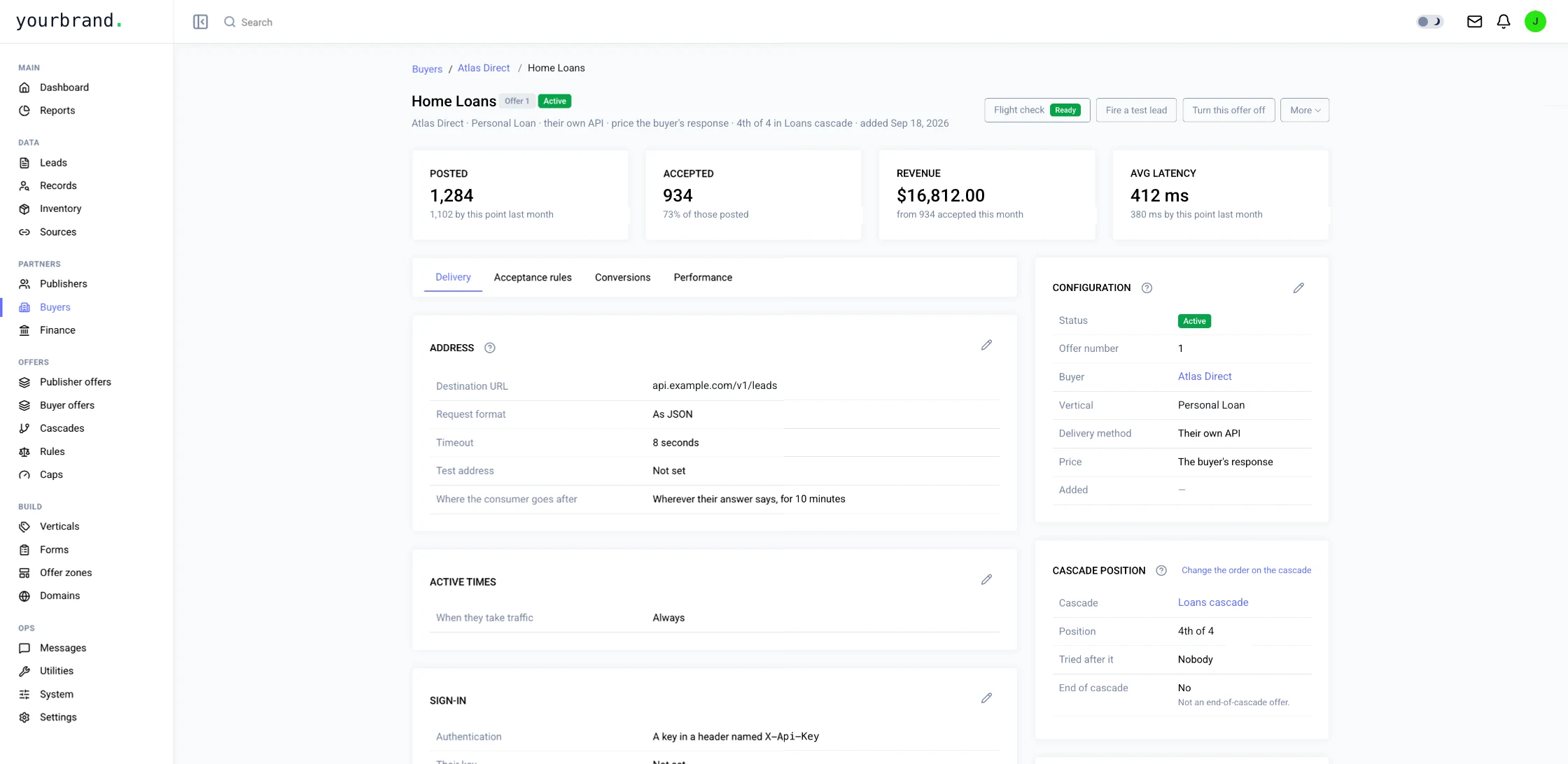
This is Buyer delivery in pingtype.
You decide
What you control in Buyer delivery.
- The buyer's address, request format and timeout
- How you sign in to the buyer: a key sent in a header
- Which fields are sent, what they are called and which are required
- Where to find the status, price and next page in the reply
- When the buyer takes traffic
- Where the consumer goes after the sale
- Whether you deliver by the buyer's API or straight to them
Questions
Can I test a buyer before it goes live?
Yes. Fire a test lead from the buyer offer, and use the flight check to see what is still missing.
What if a buyer has no API?
A buyer offer can deliver straight to the buyer, using the buyer's own postback instead of an API.
Is the buyer's key kept safe?
The key is never shown again once it is saved. You can only replace it.
What happens to the consumer after a sale?
The buyer's reply can include an address to send the consumer to next.
Works with
Buyer delivery fits with the rest of pingtype.
More of the platform